
If you are a government supplier or contractor in Pakistan, registering with the PIFRA Vendor Information System is mandatory to ensure secure and timely payments. Operating under AGPR, this system acts as a digital link between government departments and vendors, allowing smooth tracking and verification of financial transactions. Without a registered vendor number, payments cannot be transferred to your bank account.
If your payment is delayed due to vendor registration issues, you are in the right place. In this guide, I will explain what a vendor number is, how to apply for it, how to verify your vendor details, and how to resolve common problems faced during the process.
How to Check Your PIFRA Vendor Number Online
Suppose you are a government contractor supplying office furniture to a government college in Punjab. If your vendor number is missing from the payment file, your payment may be delayed, even after completing the order and submitting the invoice. This clearly highlights the importance of having a vendor number for smooth payment processing. However, there is no need to worry. You can easily find your vendor number by following the step-by-step method given below.
Step-by-Step Method to Check Vendor Number Online
1. Visit the Official PIFRA Portal:
- Open your web browser and search for https://m.pifra.gov.pk/vendor_info#.
- This link will take you directly to the Vendor Information section of the PIFRA portal.
2. Enter Your Personal Details:
- On the page, you will see two required fields:
- Government
- NTN / STN / CNIC
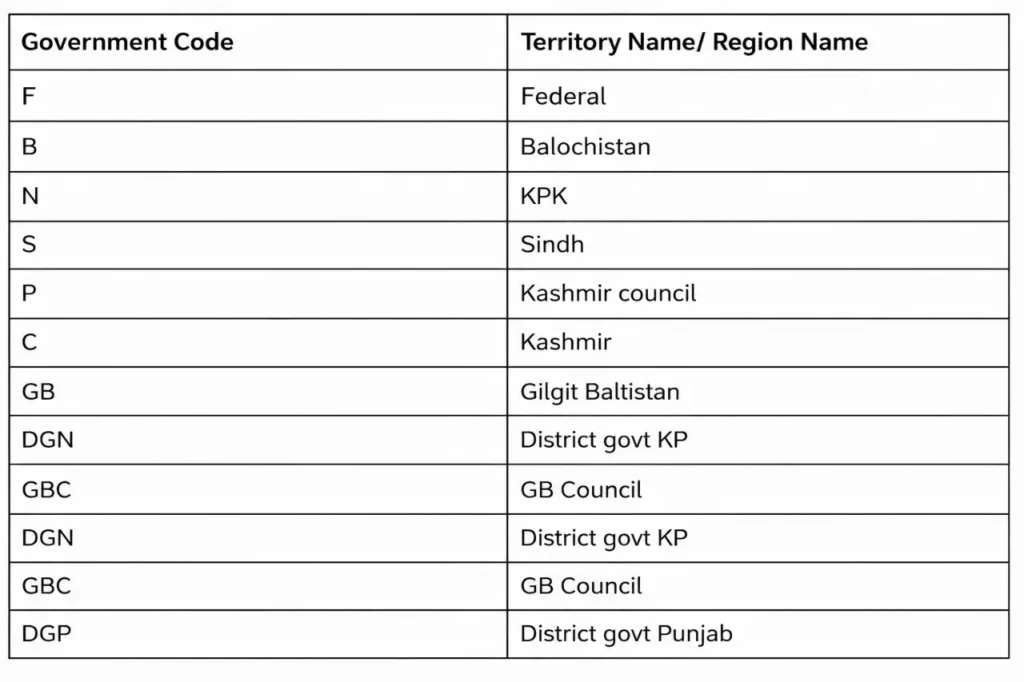
- In the Government field, enter your government code:
- “P” for Punjab Government
- “F” for Federal Government
- If you are unsure about your government code, you can verify it from the reference table provided on the page.
Submit and Retrieve Your PIFRA Vendor Number
- Click on the yellow “Search” button to proceed.
- Your PIFRA vendor number will be displayed on the screen.
- Make sure to save or print the vendor number for future reference and use in payment documents.
Additional Information for DDOs
- Through the online PIFRA portal, a Drawing and Disbursing Officer (DDO) can monitor the complete budget execution report.
- For detailed guidance, refer to our article on “PIFRA DDO BER Budget and Monthly Expenditure.”
Common Issues While Checking Vendor Number and Their Solutions
Vendor Number Not Found:
This issue usually appears when the CNIC is entered incorrectly. In some cases, users attempt to check their vendor number without completing the registration process, which also results in this error.
Solution:
Always verify your CNIC details carefully before submitting the form and make sure your registration process is fully completed. This will help you avoid errors while checking your vendor number.
Portal Not Loading or Site Down
You might encounter problems accessing the portal or notice that the site is not loading. This usually happens due to server maintenance by PIFRA or heavy traffic on the website.
Solution:
- Try opening the portal in a different browser.
- Clear your browser’s cache and cookies.
- Use an alternative internet connection to see if the issue gets resolved.
“It is advisable to take a screenshot or print your vendor number page for future reference, as you may need it urgently at any time.”About Vendor Information System in Pakistan
In PIFRA’s advanced payment system, registering and verifying a vendor number is essential for all contractors and suppliers working with the government.
- Importance:
- Essential for all contractors and suppliers working with the government.
- Ensures smooth transactions, transparency, and accountability.
- Tracking and Verification:
- Allows both vendors and the accounts office to track payment history.
- Shows delays or rejections directly via the PIFRA portal.
- Promotes transparency and accountability for all parties.
- Bank Payment Integration:
- Vendor number is linked to the vendor’s bank IBAN.
- Eliminates the need to visit government offices to receive payments.
- Approved payments are routed directly to the linked bank account via electronic fund transfer.
- Preventing Fake Entries:
- Each vendor has a unique identification code tied to their CNIC and bank account.
- Helps avoid fake entries, duplicate bills, and ghost vendors.
- Online Verification and Financial Record Keeping:
- Vendor number generates audit trails and payment logs in the system.
- Payments can be traced in case of fund mismanagement.
- Serves as a complete financial record for every registered vendor.
- Additional Tip:
- To check whether a bill is approved, refer to the article: “How to Track PIFRA Bill Status Online?”
AGPR PIFRA Vendor Number Registration Online Form Submission
To work with the government as a vendor, you must have a unique vendor number issued by AGPR. Without this number, payments cannot be processed, even after you have fulfilled your orders. Therefore, it is essential to submit the application form to obtain this vendor number. Follow the step-by-step tutorial below to complete the registration process.
Visit the Official AGPR Website:
- Go to the Accountant General Pakistan Revenues (AGPR) official website: https://agpr.gov.pk/
- Locate the “Vendor Registration Section”, usually under the “Services” menu.
Download the Vendor Registration Form:
- Download the vendor registration form from the portal.
Fill in the Required Details:
- Business Name
- Address
- CNIC
- Bank Account Details (IBAN)
- NTN
- Contact Information (Email and/or Phone Number)
Submit the Form:
You can submit the completed form in one of three ways:
- Online Submission: Upload the filled form directly through the AGPR portal.
- Email Submission: Send the completed form to AGPR via email.
- Physical Submission: Submit the form in person or via post/courier.
Approval and Verification:
- AGPR officials will review your submitted details.
- Your information will be verified.
- Once approved, your vendor number will be issued via email or courier.
How to Complete PIFRA Vendor Number Verification
Verifying your PIFRA vendor number is an important step to ensure your registration is active and linked correctly for payments. Follow these steps:
- Visit the PIFRA or AGPR Portal:
- Go to the official PIFRA/AGPR website.
- Locate the Vendor Verification Section.
- Enter Your Details:
- Provide your vendor number, CNIC, and other required information.
- Submit for Verification:
- Click the Verify or Submit button to check your registration status.
- Check Verification Status:
- The portal will confirm whether your vendor number is verified and active.
- If there are errors, follow the instructions to update or correct your details.
- Confirmation:
- Once verified, your vendor number is fully functional for receiving payments and tracking transactions through PIFRA.
Frequently Asked Questions
Final Words
In short, a PIFRA Vendor Number is more than just a requirement, it forms the foundation of financial interactions between vendors and the government. It enables accurate bill tracking and ensures seamless payment disbursement. At the same time, it acts as a financial identity for vendors, allowing them to monitor their transactions anytime.
Don’t wait for payment issues to arise. Follow the step-by-step tutorial above to apply for or verify your vendor number today, and bookmark this page for future updates.