
Have you received your PIFRA salary slip by email this month? If not, you might not be aware that you can now view and download your monthly salary slip easily on your mobile or desktop from home. The PIFRA online salary system allows government employees to register using their CNIC and receive salary slips directly in their email inbox. In this guide, I will walk you through the complete step-by-step process to create a PIFRA account and download your salary slip.
Download the PIFRA salary slip online by CNIC
PIFRA has simplified the process of downloading your monthly salary or pay slip. With just your CNIC number, you can access your payslip within minutes. All records of your previous and current salary slips are regularly updated by the government. Simply click the “Download” button and follow the step-by-step instructions to view or download your payslip.
About PIFRA Salary Slip:
It is an official financial document issued by the government to employees, showing a detailed breakdown of their salary for a specific period. It includes the following information.
Employee Information:
It includes:
- ✅ Employee’s Name
- ✅ Employee ID
- ✅ Contact Information
- ✅ CNIC
- ✅ Basic Scale
- ✅ Designation
- ✅ Bank Account and Other Details
Pay Period:
This shows the period during which the salary is paid, usually one month (for example, from 1 October to 1 November).
Gross Salary:
Gross salary refers to the total earnings before any deductions. It includes basic pay along with allowances such as house rent, conveyance, and other benefits.
Deductions:
This section lists all applicable deductions, including:
- Income Tax
- Provident Fund
- Professional Tax
- GP Fund
- Loan repayments or installments (if applicable)
Net Pay:
Net pay is the final amount credited to the employee after all deductions and taxes have been subtracted.
PIFRA Pay Slip Online Registration for Government Employees
First, you need to register on the PIFRA portal and create your PIFRA account. Once registered, you can easily download your salary slip using your CNIC. PIFRA stands for “Project to Improve Financial Reporting and Auditing.” It is an initiative launched by the Government of Pakistan to modernize and digitize financial reporting and auditing systems across government departments.
How to Create a PIFRA Salary Slip Account Online
Simply follow the given steps and complete the registration process for the PIFRA salary slip account.
Visit the PIFRA Payroll Salary Slip Website:
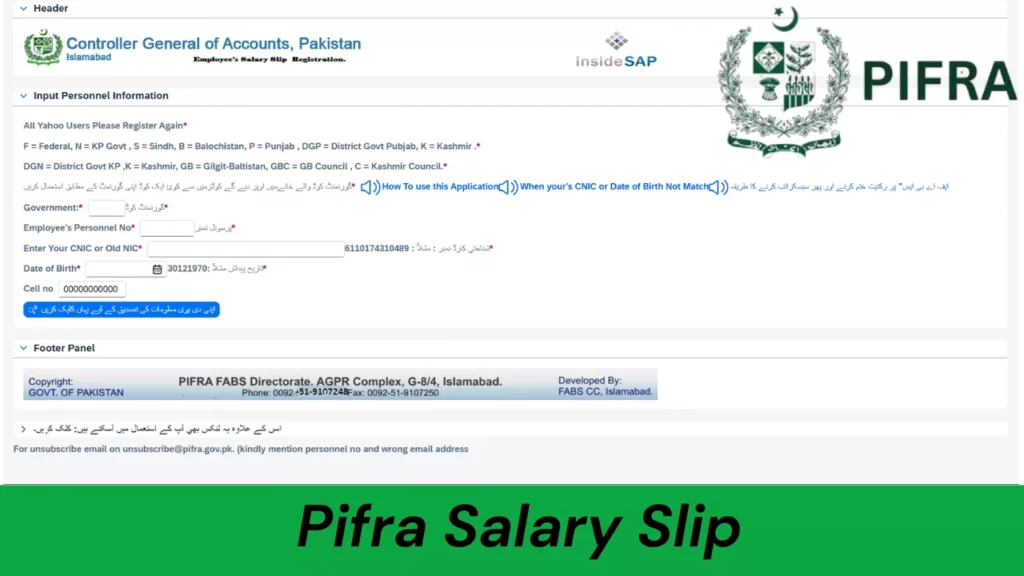
Open your web browser and visit the official PIFRA website at https://m.pifra.gov.pk/.
Fill Out the Registration Form:
Once the website opens, the registration form will appear on your screen. Enter all the required information in the provided fields and click on “اپنی دی ہوئی معلومات کی تصدیق کے لیے یہاں کلک کریں” to proceed.
Complete Email or Mobile Verification:
You will receive an OTP code on your registered mobile number or email address.
Confirm the Verification Enter the received OTP code to verify your details. After successful verification, your PIFRA registration process will be completed.
Download Your PIFRA Salary Slip PDF Online for Free
Through Registered Email
Once your PIFRA registration is complete, your salary slip will be sent to your registered email every month.
Steps:
- Open your email account and locate the PIFRA salary slip email.
- Open the email to view your salary slip.
- Click on the “Save” or “Download” option to save it as a document on your device.
- The salary slip will be stored in your device’s Downloads folder. You can also take a screenshot to save it in your gallery.
- If your computer or device is connected to a printer, you can print the salary slip directly.
Through PIFRA Account Login
This method is specifically for DDOs (Drawing and Disbursing Officers) and other authorized officers. After completing registration, they will receive a username and password via email. These credentials can be used to log in and access salary slips for any month.
Steps:
Step 1: Login to PIFRA Portal
- Open your browser and visit the official PIFRA login portal: https://mail.pifra.gov.pk/
- Enter your username and password in the login box to access your account.
Step 2: Find the Salary Slip Option
- Once logged in, go to the “Salary Slip” option on the home screen.
- Click on “Payslip” to proceed.
Step 3: Download Your Salary Slip
- Select the month for which you want the payslip.
- Click “Save” to download it. The file will appear in your Downloads folder, ready to access anytime.
Pro Tip:
Never share your PIFRA login credentials or email password with anyone. Keeping your login information secure ensures your personal financial records remain safe.
What to Do If PIFRA Salary Slip Is Not Received
Sometimes, even after completing the PIFRA registration process, employees may not receive their salary slips. There can be several reasons for this. Here are some common issues and their solutions:
Check Your Promotions or Spam Email Folder
Your PIFRA salary slip email may have been filtered into your spam or promotions folder. Make sure to check these folders carefully before taking further action.
Incomplete PIFRA Registration
This is one of the most common reasons. Some people start the registration process but do not complete it after clicking “اپنی دی ہوئی معلومات کی تصدیق کے لئے یہاں کلک کریں۔”. They may fail to enter the OTP code and complete the verification process. Ensure that you follow all steps in the PIFRA registration guidelines exactly.
Technical or System Updates
At times, technical issues or system upgrades on the PIFRA portal may prevent salary slips from being delivered. In such cases, the only option is to wait for updates from the official portal.
Incorrect Email Address
If you enter an incorrect email address during registration, you will not receive your salary slips. Always double-check your email before submitting the registration form to avoid errors.
Check the Same Email Account
If you have multiple email accounts logged in on your device, ensure you are checking the same email account you used during PIFRA registration.
Contact PIFRA Support
Most issues can be resolved by following the steps above. If you still face problems, PIFRA support is available to help. You can contact them at 051-9107250 or 051-9107248, or email them at unsubscribe@pifra.gov.pk.
PIFRA DDO Salary Slip
A DDO salary slip is a document issued to government employees by the Drawing and Disbursing Officers (DDOs) of their respective departments. Unlike individual employee salary slips, a DDO salary slip provides a summarized overview of salaries for multiple employees within a department. The DDO is responsible for managing the department’s salary funds and ensuring they are properly disbursed to employees. They are accountable for all financial transactions and the accurate distribution of these funds.
FABS PIFRA Pay Slip
A FABS salary slip is generated through the FABS system and displays the financial details of government employees within the system.
FABS, which stands for Financial Accounting and Budgeting System, is a modern system that uses SAP-ERP-based platforms for managing financial transactions. FABS and PIFRA work closely together, coordinating to ensure efficient and effective financial management for government employees.
Final Words
I am confident that you can now easily download and view your PIFRA salary slip using your CNIC. If you work in any government department—such as health, education, armed forces, or others—be sure to create your PIFRA account by following the steps outlined above. This is a valuable service provided by the Government of Pakistan, allowing employees to access, download, or print their salary slips anytime, completely free of charge.
If you encounter issues like “salary slip not received,” refer to our guide above. It provides solutions that will help you resolve such problems quickly and efficiently.